SEO tools

Lisa relevance vs Miratext: content analysis for SEO
Lisa turns competitor content analysis into page-editing tasks: expand topic coverage, adjust occurrences in the right area, revise metadata and give your writer an actionable brief.
Lisa relevance is SEO.LISA's tool for analysing a page against a target search query and turning competitor data into specific content edits. It finds missing topical vocabulary, checks words and phrases, and treats body copy and link anchors as separate areas. The output is an editing plan: what to add, which repetitions to reduce, where to make each change and what to hand to a writer.
Lisa combines several aspects of content relevance: topic coverage, use of query terms, frequency, word combinations and context. An SEO specialist can use it to optimise an existing page, review a draft or prepare a brief before writing starts. This guide explains our tool, walks through a demonstration report and compares its workflow with Miratext.
What an SEO specialist can do with Lisa
Consider a service page that already mentions its target query in the Title and H1. The copy is finished, but you still need to check whether it covers the topic fully and which parts need attention. Lisa helps you investigate several specific questions.
- What is missing? Find topical terms used by the selected competitors but absent from your page, accounting for word forms.
- Which occurrences need changing? See where a term appears less or more often than the reference pages, with proposed additions or reductions for each area.
- How do competitors address the query? Inspect their phrases, metadata and complete passages.
- What should the writer receive? Turn the findings into tasks for body copy, anchors and metadata, while keeping the detailed analysis for your own review.
You can also analyse competitors before your page exists. This produces vocabulary and targets for a new brief. When you supply an existing page, the report can show current counts and changes as well. An absent target page is not treated as a measured page with zero occurrences.
Topic breadth and depth of term use
Breadth: vocabulary your page does not yet cover
The Width (LSI) section lists relevant vocabulary from competitors that is missing from your page. Existing word forms are taken into account: a variation already used in the content is not simply treated as a completely missing term. The report also lets you inspect the forms it found.
The list gives you starting points for expanding the content. In a teaching example involving a landscape design service, a writer might need to explain the project deliverables, preparation stages or site conditions. Those are illustrative editorial choices, not a fixed list that Lisa assigns to every landscaping page. Your actual recommendations come from the pages included in your analysis.
Lisa also lists vocabulary unique to your page within the selected group. This helps you retain a brand name, a particular technology or a useful detail about your service. A competitor's omission is not a reason to remove information your customers need. Source excerpts show how the missing vocabulary is used in context.
Depth: where and how often terms appear
The depth recommendations show frequencies and ranges. A separate table offers the competitor median as another reference. Body copy and visible anchor text are counted separately, so repeated wording in links is not a task to add that same wording to a paragraph.
Each editing-plan row identifies the term, area, current count, target and signed change. +5 means add five occurrences in that area; −3 means remove three repetitions. Zero means no change, while a dash marks a value that has not been calculated. Priorities organise the work, with query terms given attention when the plan is prepared.
Choose one reference for your edits: the range recommendations or the median recommendations. Do not work through both lists in succession. The purpose is to improve the page while keeping its wording readable.
How to investigate the recommendations
Lisa lets you move from a suggested edit to the underlying detail. The unigram table shows individual terms and their forms; N-grams show recurring combinations. Comparative metrics include content volume and BM25, while the analytical tables include TF-IDF. Together they help you inspect how vocabulary is distributed across the selected pages.
Relevant passages preserve complete source blocks containing query terms. Read them to understand which point a competitor is making and what a term means in that passage. Implementation examples link to their sources, so you can explain a writing task in your own words while retaining the original context for reference.
The sources section identifies included pages and exclusions. If useful content has not loaded, check the parser and extraction area first. Lisa supports ordinary page retrieval, JavaScript rendering and a CSS selector for the content you want to analyse. Domain exclusions help remove unsuitable sites from the reference set.
Lisa relevance and Miratext compared
The Miratext analyser accepts text and URLs, compares pages and generates writing briefs. It also offers competitor discovery through search results. Its purpose overlaps with Lisa's; describing it simply as a keyword-density checker would miss that functionality.
| Task | Lisa relevance | Miratext |
|---|---|---|
| Select reference pages | Google or Yandex with a location, or your own URL list | A URL list or search-results analysis |
| Review copy and anchors | Separate areas with their own targets and changes | Separate body, link and combined measurements |
| Find terms to work on | Missing vocabulary with word forms, phrases, passages and implementation examples | Words, bigrams, trigrams and density-based selection |
| Work on metadata | Editable Title, Description and H1, draft checks and competitor tags | Competitor metadata and headings |
| Brief a writer | Actionable Word brief; full analysis or individual tables in Excel | Brief generator, shareable task link and occurrence checks |
| Set occurrence changes | Prioritised plan, targets and deltas, with ranges or medians as references | Recommendations based on median density and chosen length |
Features were checked on 27 October 2026. The Miratext entries are based on its public form and official guide in Russian. This is a comparison of documented functions; it does not rank speed, calculation quality or SEO outcomes.
Consider Lisa when you want to follow a finding from a missing term to a source passage, an edit in a specific area and a Word brief. Its metadata editor lets you check a new version within that workflow. For international projects, Lisa offers an English interface and analysis of original English queries and pages. It does not replace the source material with translated Russian keyword data.
How to run an analysis in Lisa
- Enter your query and choose the analysis language. Use the original English query for English pages. Interface language and content-analysis language are separate choices.
- Supply your page. Enter a URL, paste HTML or add text. Choose the mode without a target page when preparing content from scratch.
- Select competitors. Choose a search engine and location, or enter URLs manually. International Google options include the United States, United Kingdom, Canada and Australia.
- Review extraction settings. Set exclusions, the retrieval method and the content area as needed, then start the analysis.
- Check the sources and editing plan. Confirm that the required pages loaded. Then inspect missing vocabulary, term counts and the passages explaining the findings.
For a service page, select competitors offering the same service and addressing the same query. A mixed group containing a category, a guide and a company page may need manual adjustment. If you are still deciding what visitors need to see, start with service-page structure before working on the detailed wording.
Reading the plan: a teaching example
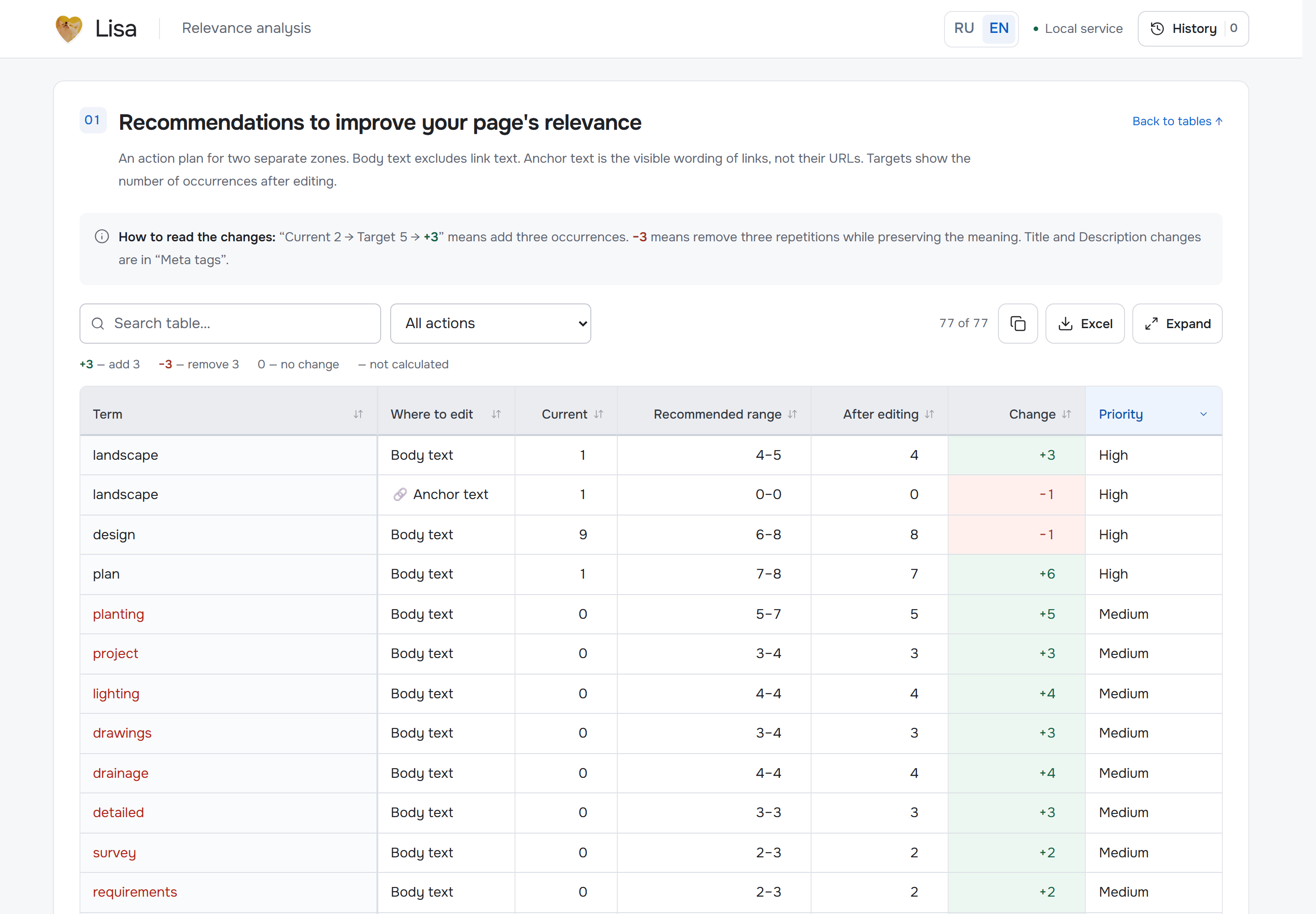
Lisa's English interface with synthetic teaching data, from the public product description. Select the image to open the original PNG at full size.
The landscape row shows 1 → 4, +3: add three occurrences in body copy, leaving four after editing. The design row shows 9 → 8, −1: remove one repetition. The value after the arrow is the final target, not the number to add.
To act on the first row, you might explain a missing part of the service, such as what a landscape plan includes. For the second, find a redundant use of the term and rewrite the sentence without losing information. Rows marked with a link icon concern anchors: carry out those changes in link text.
The illustration belongs to a synthetic report; your page receives its own analysis. Check both coverage and readability in the edited version. Google's spam policies identify unnatural repetition of keywords as keyword stuffing.
Metadata and structured-data tasks
The metadata section accepts your draft Title, Description and H1. It checks query terms and their forms, repetitions, length and HTML. Comments appear below the fields, alongside a preview and the competitors' actual tags. You can copy a single tag or the complete set.
Metadata drafts are saved in your browser. Editing them in Lisa does not replace the live tags on your website; you apply the approved version yourself.
The structured-data section suggests suitable missing types, explains the reason and gives an implementation task. It uses evidence from your page's content and excludes types already detected. Plain-text input alone does not establish that markup is missing from the live page. This section helps you brief a developer.
What to give the writer and what to keep for analysis
The Word brief contains work to carry out: body-copy and anchor edits, target counts, missing vocabulary, phrases, metadata tasks, examples and delivery checks. The writer can work from recommendations without having to interpret every analytical table. Supply it together with verified information about the product or service.
The Excel report retains the detailed measurements, tables, word forms and sources. You can export the full report, download an individual table or copy filtered rows. Keep it for your own investigation and to record the page's state before editing.
After implementation, reopen the saved report from history and repeat the analysis with the same competitor set. Check which tasks have been completed and which remain. Assess search performance separately through rankings, traffic and enquiries over your chosen reporting period. A BM25 value or a completed occurrence target does not by itself guarantee higher rankings.
Try it with one page
Choose a page and its target query, supply the URL or draft, then select search results or your own competitors to produce an editing plan. A first review is easier to follow when you work through one complete cycle: analyse, select recommendations, brief, implement and recheck.
See the Lisa relevance feature guide or open Lisa to analyse a page. Sign-in is available to anyone who confirms their email address with the emailed code.
Share this article