SEO

How to Turn a Relevance Analysis into a Useful Content Brief
For each selected finding, name the page area, the edit, how it helps the reader and how you will review it. Treat suggested term counts as comparison data, not instructions to repeat or remove words mechanically.
A useful content brief turns relevance-analysis findings into specific writing tasks. For each selected finding, name the page area, describe the change and explain how you will check it. A suggested term count is a prompt to investigate, not an instruction to repeat a phrase a set number of times.
Use a clear sequence: check the page, query and competitor sample; read the context behind relevant findings; choose edits that serve the page; then write tasks the author can complete and you can review. Neither a term list nor the gap between a current and suggested count makes the editorial decision for you.
Check the page, search task and competitor set
Record who the page serves, what question it answers and what action it should help a visitor take. A service page, for example, may need to explain what the service includes so a prospective client can decide whether it meets their needs.
Review the analysis settings and selected URLs. Check the search engine, language, location where relevant and the types of pages in the sample. A blog post, an online shop category and a service page may cover the same subject but answer different needs. Do not use a competitor page as a model for the whole draft simply because it appears in the results.
Keep the selected URLs with your notes and record why each one belongs in the comparison. If the sample includes different page types, use them to investigate particular questions rather than treating them as one template. The findings depend on the pages selected, so review the sample before translating observations into a brief.
Separate observations from editorial decisions
An observation describes what the analysis shows: selected pages may cover a subtopic, use a term in a particular context or include it in visible link text. An editorial decision is whether your page should change, where the edit belongs and how it would help the reader.
Before adding a finding to the brief, check four things:
- Page purpose: will the edit answer a visitor’s question or clarify the offer?
- Accuracy: does the business have information to support the copy?
- Location: which section, anchor or metadata field needs editing?
- Acceptance check: what should the reader understand afterwards, and how will you check?
If a recommendation conflicts with the actual service or depends on facts you do not have, do not ask the writer to fill the gap with assumptions. Note what needs clarification and ask the person responsible for the offer.
Specify which part of the page needs editing
Main copy, visible link text and metadata have different jobs. Name the element in the brief so the writer knows where to make the change.
Main copy
Name the section and explain what the reader needs to learn. Instead of “add more about the project”, specify the information that belongs on the page. For example, if it matters to the service and the business can confirm it, ask the writer to explain what information a specialist needs at the start of a project. If the answer is not available, flag it for clarification.
Visible link text
An anchor is the visible text of a link. If it needs editing, name the link and destination, then ask for wording that tells readers where it leads. Do not insert a query phrase mechanically: the anchor should describe the destination page and read naturally in its sentence.
Title, description and H1
Give metadata its own task instead of mixing it into instructions for the main copy. Explain what each field should communicate, then review the finished wording for accuracy, clarity and repetition. Google recommends descriptive, concise page titles and advises against keyword stuffing. Google generates title links in Search from several sources, so changing a page title does not guarantee that the result will display exactly that wording. See Google’s guidance on title links.
Prioritise edits by value to the page
A large gap between a current and suggested count does not make an edit more important. Start with changes that answer a useful question, clarify the offer or fill a genuine gap in the content. Defer less useful suggestions or those that depend on information you still need to confirm.
If the analysis provides both ranges and medians, choose one reference for a particular editing decision and use it consistently. Do not turn both into targets for the same copy; that gives the writer conflicting instructions.
When a finding points to a subtopic, read the relevant passages on the selected pages. A list of terms can help you spot a subject to investigate, but it cannot tell you what your page should say. Put the reader’s question or missing explanation in the brief, not a bare list of words.
A synthetic example: turn plan rows into writing tasks
The image shows a public teaching example with synthetic data, not a client result. In the body-text zone, “landscape” changes from 1 to 4: the current count is 1, the target is 4 and the signed change is +3. “Design” changes from 9 to 8: the current count is 9, the target is 8 and the signed change is −1.
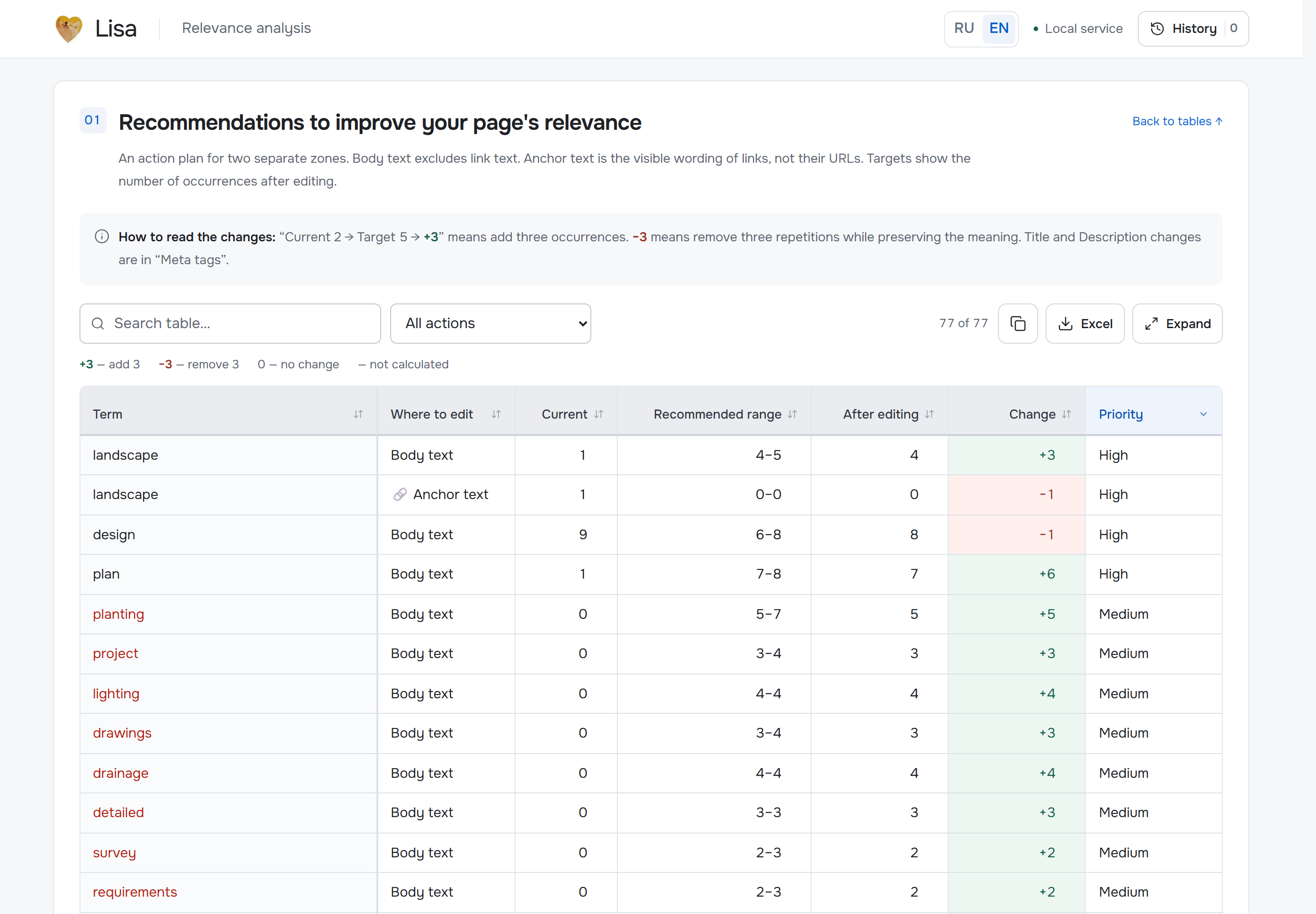
SEO.LISA teaching example with synthetic data: the figures show analysis output, not universal targets. The screenshot is published on the Lisa relevance page. Image source
If the page describes a landscape-design service, the first row is a reason to check whether it explains the relevant work or project scope. If that information matters to prospective clients and the business can confirm it, ask the writer to add it in the right section. The acceptance check is a clear explanation, not three extra mentions of “landscape”.
The second row does not mean deleting one mention of “design” automatically. Ask the writer to review the context and rework a phrase only if it is repetitive or adds no meaning. The finished copy should read naturally, retain important information and answer the reader’s question.
Use the analysis to prepare the brief
Lisa relevance is SEO.LISA’s content relevance analysis tool for SEO specialists. It compares the breadth of topic coverage and patterns of term use on a page with selected search competitors, then produces an editing plan. It can help identify topics to review; the specialist still decides what belongs in the brief. Analysis is available for Russian and English content, using selected pages from Yandex or Google results or a specified URL list.
- Choose the input. For an existing page, provide its URL, HTML or text. When preparing a new page, analyse competitor pages without an existing draft.
- Review the sample. Choose the search engine and relevant pages. Check that they serve the same purpose as your planned page. Replace pages of a different type, or use them only to investigate a specific question.
- Review coverage and context. Look at topical vocabulary and grouped word forms, then open relevant passages from the source pages. The analysis treats body text and visible anchors as separate zones. Read the term in context before deciding whether your page should cover that subject.
- Choose one editing reference. If you use suggested ranges or medians, select one approach for the decision at hand. Current counts, targets and signed changes show what to review; they are not mandatory word counts.
- Prepare the task. Export actionable editing recommendations to Word as a starting point for the writer’s brief. Keep full metrics and tables in Excel when you need to review the analysis. Rewrite each selected recommendation as a task with a named page area, a reason and an acceptance check.
For a separate metadata task, Lisa’s editor checks query terms, word forms, repetition and length in Title, Description and H1, and shows competitor tags. It saves drafts in the browser and does not change the live website. The Lisa relevance page describes the tool; you can open Lisa relevance directly. For a broader overview and its comparison with Miratext, see the existing Lisa relevance vs Miratext guide.
A brief template and a post-edit review
Give each task five fields:
- Page area: name the copy section, a specific link anchor or a metadata field.
- Finding: state what the analysis or page review showed.
- Writer’s action: say what to add, clarify, remove or rewrite.
- Reason: explain which reader question the edit answers.
- Acceptance check: describe how you will check accuracy, completeness and unnecessary repetition.
After editing, check that the writer changed the right section, used information the business can confirm and did not introduce repeated or contradictory explanations elsewhere. Review anchors and metadata separately if they were included in the brief. A changed report count alone is not a reason to accept the copy.
Google suggests checking whether content provides original value, covers its subject sufficiently and helps its intended audience. These are useful editorial questions, not a ranking formula or performance promise. See Google’s guidance on helpful, reliable, people-first content.
When the findings need further checking
If the selected pages serve a different purpose, do not transfer their structure wholesale. If a term appears more or less often than expected, inspect its context and your own copy before deciding whether to edit it.
Do not create a separate page for every term or closely related question in the analysis. First check whether the existing page can answer the question fully. Google lists substantially similar pages aimed at similar queries that funnel visitors through an intermediate page rather than to useful content as an example of doorway abuse. This does not mean every related page breaches policy; the page’s purpose and value to visitors matter. See Google’s Search spam policies.
A relevance analysis can help you find topics to investigate and organise potential edits. A specialist decides what will improve the page. A useful brief connects each selected finding to a reader’s need and explains how the writer can make and check the change.
Share this article